Automation you can read before you run it.
An automation is a state machine. Author it that way, simulate it, and ship the same artifact you reviewed.
Open the workspace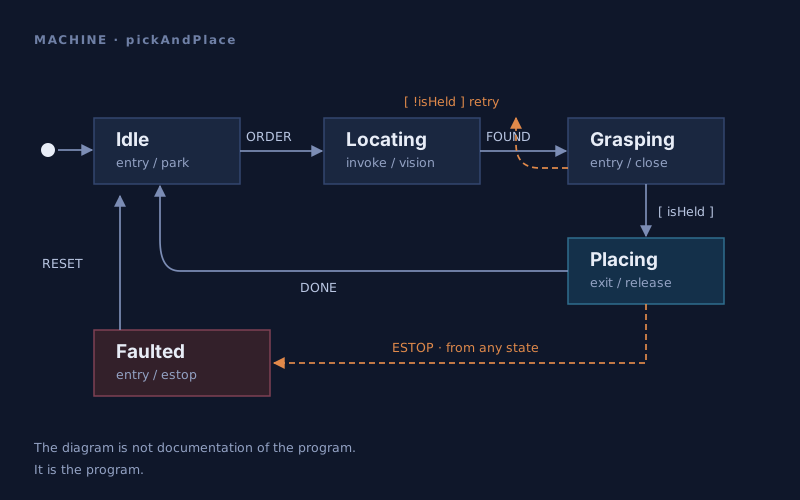
Most automation fails in the gaps nobody drew.
A flowchart in a document and the code on the controller drift apart the day after they are written. A state machine cannot drift from itself: what you read is what executes, including the case you would rather not think about.
COMPOSITION
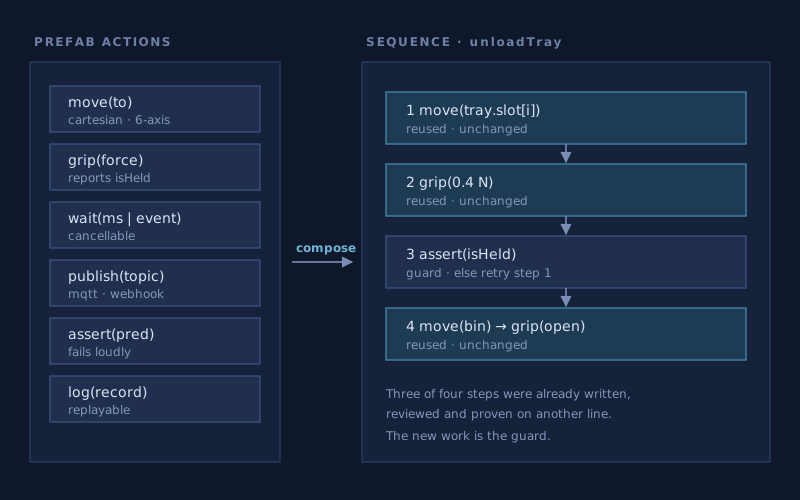
Build from parts that already work.
Move, grip, wait, publish, assert, log — a library of actions proven on real lines. A new routine is mostly assembly, so review has one place to look: the part that is genuinely new.
What the workspace gives you
Everything between the idea and the machine on the floor.
Author as machines
States, transitions and guards on a canvas backed by XState. The diagram is the source, not a picture of it.
Simulate before you commit
Drive events by hand and watch the machine take them. Find the unhandled event at a desk instead of on a line.
Reuse prefab actions
A shared library of actions and whole sub-machines. Fix one, and every routine that assembled it improves.
Make the failure path explicit
Guards, timeouts and a fault state are first-class, so the unhappy path is something you designed rather than something you discovered.
Version it like code
Machines live in your repositories and diff as structure, so a change to behaviour reads as a change to behaviour in review.
One identity
The same platform sign-in as the other SpecFocus products — no separate account to manage.
Draw the machine. Run the drawing.
Sign in to open a workspace and connect the repository your routines will live in.